
Home › HEAL › Operation theatre
HEALOperation theatre management system
Most theatre delays start outside the theatre. HEAL keeps every surgery on one record, from the consultation to the ward:
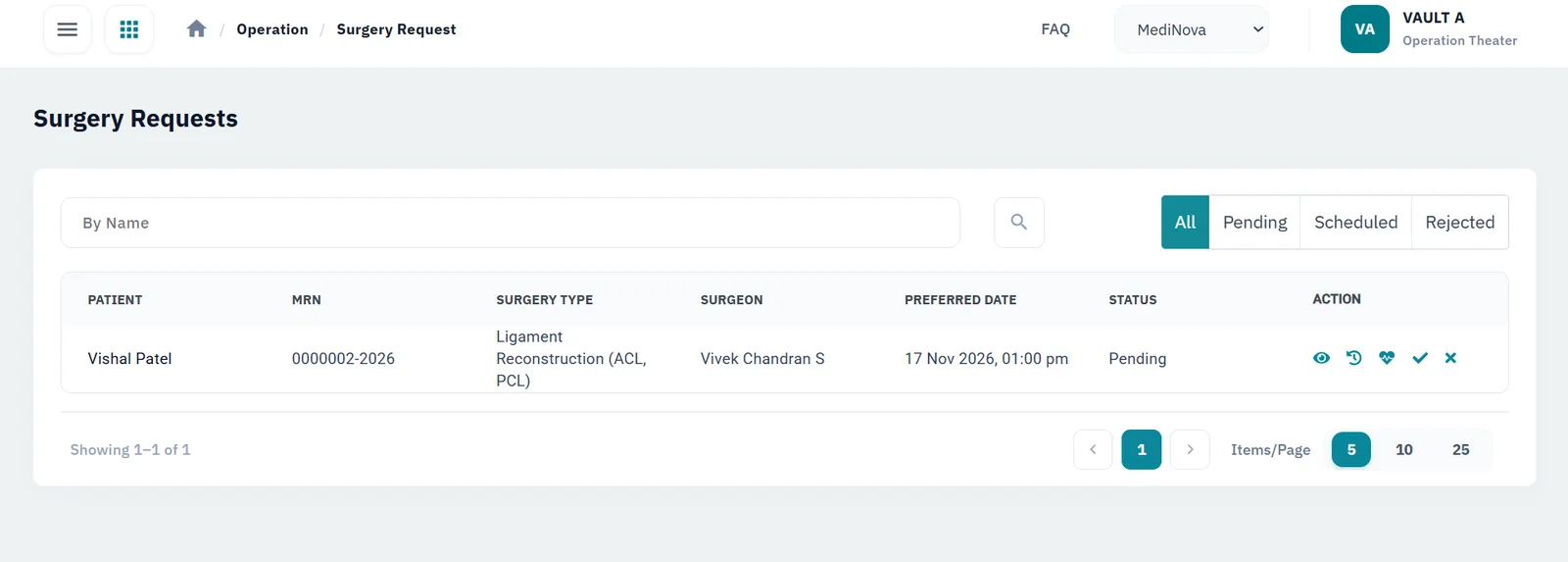
- Requests reach the OT desk the moment the surgeon raises them
- Every theatre is booked on one schedule, with clashes flagged
- Pre-op checks are on file before the theatre date
- Ward staff always know where their patient is
Built for: surgical and multi-specialty hospitals with one theatre or several, OT in-charges, surgeons, anaesthetists and ward nursing teams.
Everything the surgical team needs, on one record
Request surgery from the consultation
The surgeon raises the request while the patient is still in the room, next to admission and the prescription. Nobody carries a slip to the OT desk, and doctors, theatre and ward staff see its status from then on.
A pre-op assessment that’s on file
Fitness for surgery is recorded against the request before the theatre date, so no one is hunting for a missing form on the day.
Schedule theatres without clashes
Run every operation theatre from one schedule: each surgery is booked into a theatre and time slot. HEAL warns when the theatre or the surgeon is already taken, so double bookings are fixed before the day, not in the corridor.
Every operative phase recorded
Notes from before, during and after surgery stay on the patient’s record, not in a register in the OT.
The full history in front of the team
Allergies, vitals, lab and radiology reports are a click away for the surgeon and the anaesthetist.
Charges that don’t go missing
Staff add consumables, medicines and services to the patient’s invoice as they are used, so billing doesn’t rely on memory.
See it in HEAL
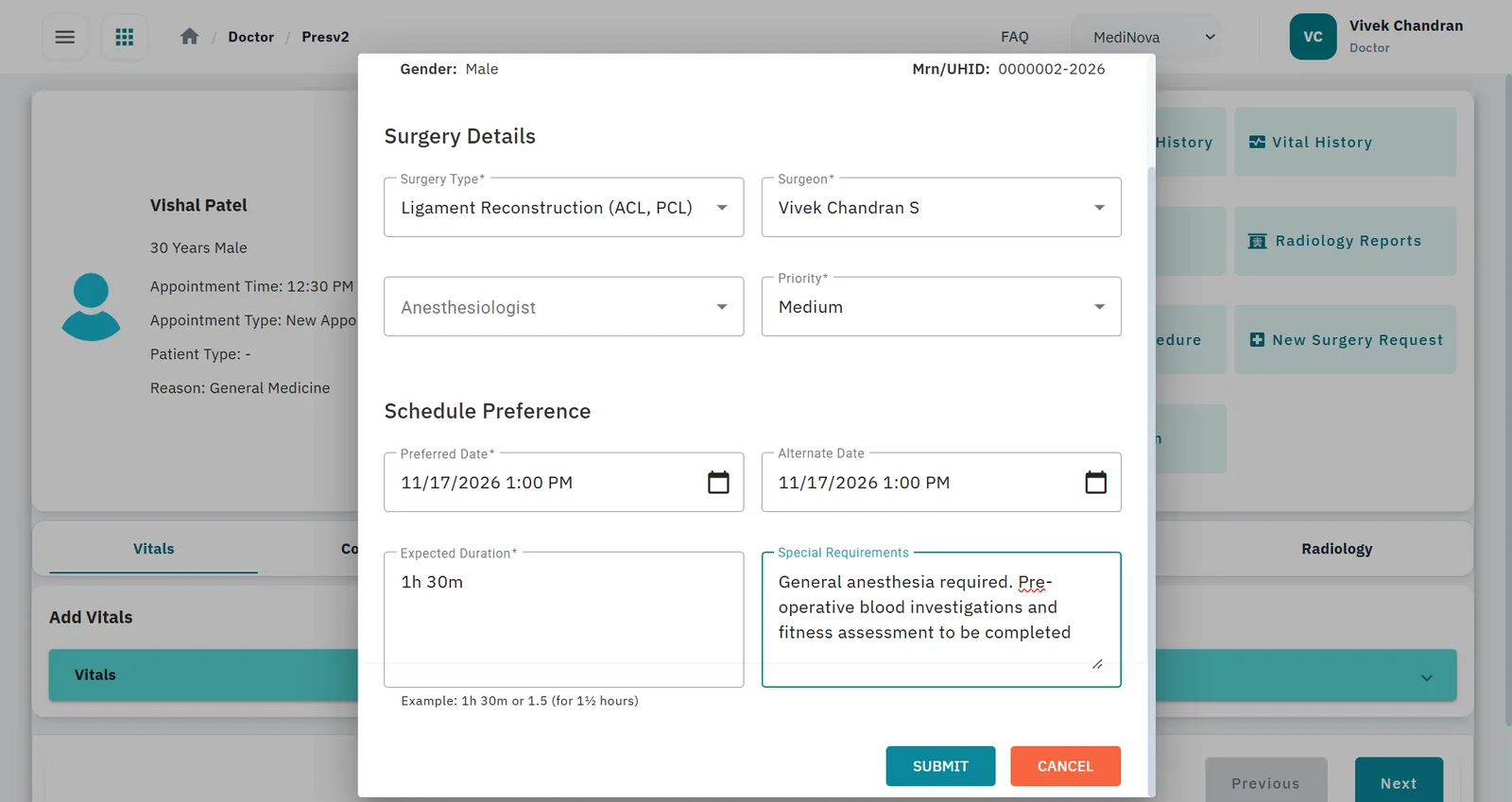
Surgery request from the consultation
Surgery type, surgeon, anaesthetist, priority and preferred schedule, raised from the doctor workspace.
How a surgery moves through HEAL
Select a step to see what happens
1. Consultation
The doctor reviews the patient's history, vitals and lab and radiology reports in the doctor workspace and decides surgery is needed.
- Full patient record
- Admission requested from the same screen
2. Surgery request
A surgery request is raised directly from the consultation, alongside admission, procedures and prescriptions. Its status is tracked from this point.
- No paper slip
- Status starts at 'requested'
3. Theatre scheduling
Each surgery is booked into a theatre and time slot on one schedule. HEAL warns when the theatre or the surgeon is already taken, so double bookings are fixed before the day.
- One schedule for all theatres
- Theatre clash warning
- Surgeon clash warning
4. Pre-op assessment
The pre-operative assessment is recorded against the request, so the patient's fitness for surgery is documented before the theatre date.
- Linked to the request
- Visible to the surgical team
5. Operative phases
The patient is managed through each phase of the operation, with notes kept on the patient record at every stage.
- Pre-operative
- Intra-operative
- Post-operative
6. Recovery & billing
Ward staff see the same record after surgery. Consumables, medicines and services are added to the patient's invoice, and the doctor discharges the patient when ready.
- Charges on the invoice
- Discharge from HEAL
What changes for your team
Surgeons
Request surgery and check its status from the same screen they consult in.
Anaesthetists
Have the pre-op assessment and the patient’s history together before the patient arrives.
The OT in-charge
Schedules theatres from one list of requests, with clashes flagged before the day instead of sorted out by phone.
Ward nurses
Can see where their patient is and read the operative notes.
Billing
Gets OT consumables on the invoice as they are added.
Questions buyers ask
Can surgeons raise a surgery request during the consultation?
Yes. It is raised from the doctor workspace, alongside admission or observation, procedures and the prescription.
Can HEAL schedule surgeries and catch clashes?
Yes. Each surgery is booked into a slot in any of your operation theatres, all on one schedule, and HEAL flags it when the theatre or the surgeon is already booked at that time.
Does HEAL record the pre-operative assessment?
Yes. It is recorded against the surgery request, so the surgical team sees it before the theatre date.
Can we use the OT module with our existing hospital system?
Yes. Each HEAL module works on its own and connects to the others, and our team integrates HEAL with the hospital information systems you already run.
How is patient data protected?
HEAL is built by InfoForte, an ISO/IEC 27001:2022 certified organisation, and is integrated with ABDM (M1, M2 and M3). See Security & compliance for details.
How is the OT module priced?
By the modules you choose, the number of doctors and sites, integrations, and any data migration and training. Book a demo and we’ll prepare a quote.
Connected HEAL modules
Hospital management
Admissions, wards, billing and discharge on one patient record.
Learn moreLaboratory
Barcoded samples, analyser integration and approved reports sent to the patient app and ABHA.
Learn moreRadiology
Imaging requests in one queue, PACS and DICOM integration, and outsourced scans tracked.
Learn moreInventory
GST-ready pricing, POs, GRNs, barcodes and expiry alerts across departments and warehouses.
Learn morePricing
How HEAL is priced: by modules, doctors and sites, integrations, migration and training.
Learn moreSecurity & compliance
How HEAL protects patient data: ISO/IEC 27001:2022 and ABDM consent.
Learn moreSee HEAL in action
Book a walkthrough with our team and bring your questions on setup, integrations and data security.
